DeveloperCube, a community for webmasters and web developers
PhotoshopForums.com Home
Navigate Free Trade Publications Contact FAQ Search Members Profile Register Login
Add Us:   MySpace   Facebook   StumbleUpon
Username:    Password:
Remember Me?    
Extract Colour
BlinkList
del.icio.us
Furl
linkaGoGo
reddit
Simpy
Yahoo! My Web
 
Post new topic   Reply to topic    PhotoshopForums.com Forum Index -> Beginner's Section
 See a User Guidelines violation? Please contact us.
Author Message

kerr7

Joined: 25 Jun 2008
Posts: 3


PostPosted: Wed Jun 25, 2008 12:57 pm    Post subject: Extract Colour Reply with quote

I'm using Photoshop CS2 and I have a picture but I only want the black part of it. Is their a way to extract only the black portion of the picture? Thanks.
View user's profile Send private message

Bazman

Joined: 04 Oct 2006
Posts: 77
Location: United Kingdon
PS Version: CS3
OS: Mac OS X Leopard 10.5

PostPosted: Wed Jun 25, 2008 1:29 pm    Post subject: Reply with quote

Can you post the picture, there are a few techniques and it all depends on the image.
_________________
Barry Flammia
Freelance Designer
www.realflairdesign.co.uk
View user's profile Send private message Visit poster's website

kerr7

Joined: 25 Jun 2008
Posts: 3


PostPosted: Wed Jun 25, 2008 7:35 pm    Post subject: Reply with quote

Yeah sorry, I tried to upload it through the forums, didn't work for me so I had to use a image hosting site: http://i278.photobucket.com/albums/kk89/kerr717/cpl2GSR.jpg
View user's profile Send private message

Bazman

Joined: 04 Oct 2006
Posts: 77
Location: United Kingdon
PS Version: CS3
OS: Mac OS X Leopard 10.5

PostPosted: Thu Jun 26, 2008 6:09 am    Post subject: Reply with quote

I would select the black with the magic wand, the go to the 'select' menu and click 'similar'.
_________________
Barry Flammia
Freelance Designer
www.realflairdesign.co.uk
View user's profile Send private message Visit poster's website

kerr7

Joined: 25 Jun 2008
Posts: 3


PostPosted: Thu Jun 26, 2008 12:00 pm    Post subject: Reply with quote

Cool, thanks a lot man.
View user's profile Send private message

combiBob

Joined: 11 Mar 2008
Posts: 75
Location: Florida


PostPosted: Fri Jun 27, 2008 3:20 am    Post subject: Reply with quote

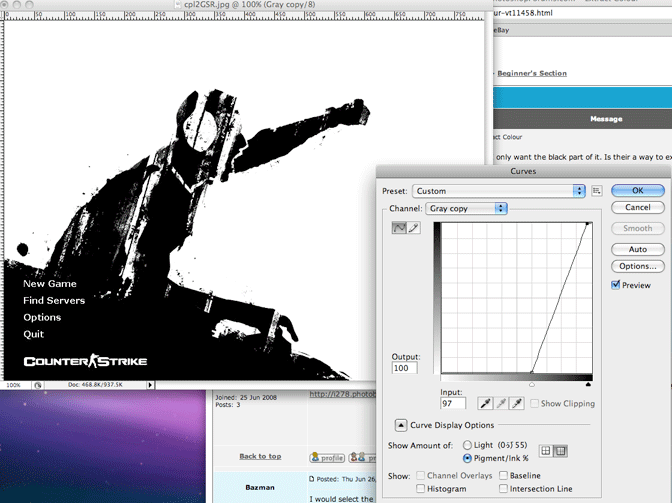
Go to Channels and make a Duplicate Channel.

Image>Adjustments>Curves

Pull out the highlight, add a bit of shadow.


Picture-1.gif
 Description:
 Filesize:  70.88 KB
 Viewed:  52 Time(s)

Picture-1.gif


View user's profile Send private message
Display posts from previous:   
Post new topic   Reply to topic    PhotoshopForums.com Forum Index -> Beginner's Section All times are GMT - 6 Hours
Page 1 of 1
Jump to:  
You cannot post new topics in this forum
You cannot reply to topics in this forum
You cannot edit your posts in this forum
You cannot delete your posts in this forum
You cannot vote in polls in this forum
You cannot attach files in this forum
You can download files in this forum


Copyright © 2003-2008. PhotoshopForums.com, iFroggy Network. All Rights Reserved.
We Support phpBBHacks.com. Powered by phpBB © phpBB Group. phpBB SEO. Privacy Policy.
We are in no way affiliated with Adobe. Photoshop, Adobe and related marks are copyright to Adobe.
PhotoshopForums.com