Community management insight at ManagingCommunities.com
PhotoshopForums.com Home
Navigate Free Trade Publications Contact FAQ Search Members Profile Register Login
Add Us:   MySpace   Facebook   StumbleUpon
Username:    Password:
Remember Me?    
Fixing Dark Areas of a Pano Sky
BlinkList
del.icio.us
Furl
linkaGoGo
reddit
Simpy
Yahoo! My Web
 
Post new topic   Reply to topic    PhotoshopForums.com Forum Index -> Techniques
 See a User Guidelines violation? Please contact us.
Author Message

zioneye

Joined: 21 Dec 2004
Posts: 7


PostPosted: Sat May 17, 2008 12:36 pm    Post subject: Fixing Dark Areas of a Pano Sky Reply with quote

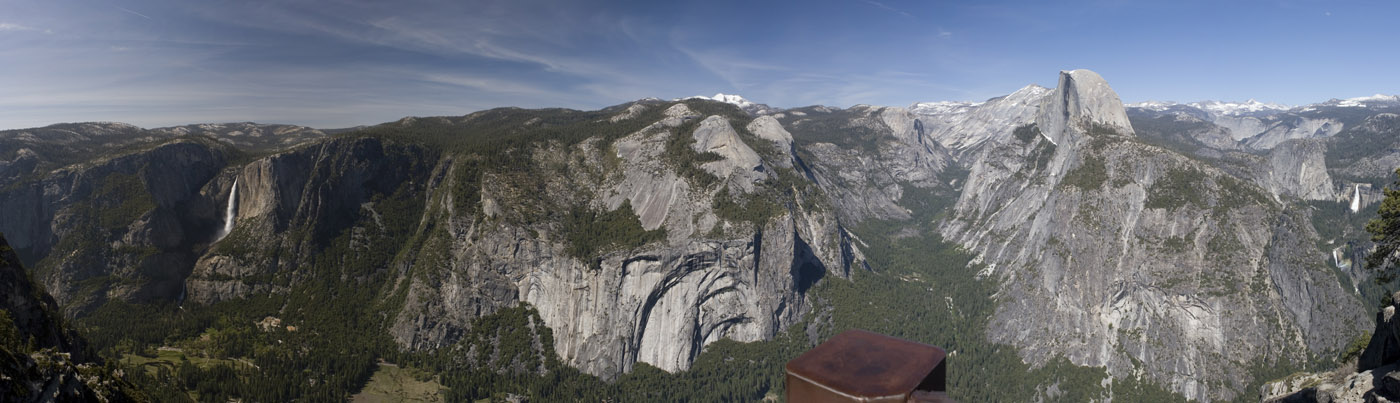
I took a panorama photo and due to the clouds wound up with dark area particularly in the sky. I can't figure out how to brighten the area up smoothly. Any ideas?

See attached Yosemite Pano.


Untitled_Panorama1 copy.jpg
 Description:
Yosemite Pano
 Filesize:  163.21 KB
 Viewed:  127 Time(s)

Untitled_Panorama1 copy.jpg


View user's profile Send private message

doubrovski

Joined: 29 Sep 2007
Posts: 206


PostPosted: Sat May 17, 2008 10:29 pm    Post subject: Reply with quote

Hi zioneye,
- Select the sky with the Magic Wand or Quick Selection tool (in CS3)
- Create adjustment layer (Layer > New Adjustment Layer > ...) Levels, Curves, or Brightness/Contrast and brighten the sky as needed
- Call the "Gaussian Blur" (Filter > Blur > Gaussian Blur) and blur the adjustment layer mask to soften the border of the edited area


_________________
Andrei Doubrovski
SimplePhotoshop.com
View user's profile Send private message

zioneye

Joined: 21 Dec 2004
Posts: 7


PostPosted: Sun May 18, 2008 7:21 am    Post subject: Reply with quote

Thanks!!!!
View user's profile Send private message
Display posts from previous:   
Post new topic   Reply to topic    PhotoshopForums.com Forum Index -> Techniques All times are GMT - 6 Hours
Page 1 of 1
Jump to:  
You cannot post new topics in this forum
You cannot reply to topics in this forum
You cannot edit your posts in this forum
You cannot delete your posts in this forum
You cannot vote in polls in this forum
You cannot attach files in this forum
You can download files in this forum


< Advertising - Contact - Links - Link to Us - Staff - Support Us - User Guidelines >

Copyright © 2003-2008. PhotoshopForums.com, iFroggy Network. All Rights Reserved.
We Support phpBBHacks.com. Powered by phpBB © phpBB Group. phpBB SEO. Privacy Policy.
We are in no way affiliated with Adobe. Photoshop, Adobe and related marks are copyright to Adobe.
PhotoshopForums.com