|
|
| Author |
Message |
witam

Joined: 27 Oct 2004
Posts: 812
Location: Belgium
|
 Posted: Fri Nov 12, 2004 3:49 am Post subject: Interesting Background While Using Only One Symbol Posted: Fri Nov 12, 2004 3:49 am Post subject: Interesting Background While Using Only One Symbol |
 |
|
The money signs like €, $ and £ can be found in the Arial font, so no need to search for them as they are right there on your keyboard. For the others, I think you can find them in Microsoft Word or a similar program (by using symbols) and then just copy and paste them. On to the tutorial:
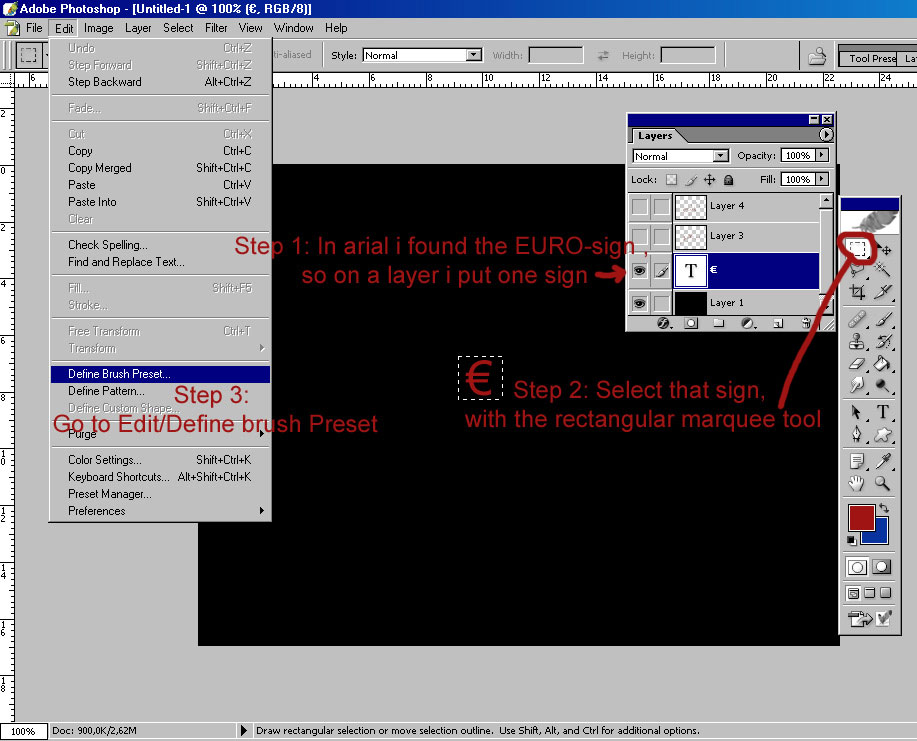
Step 1. Look at the image and follow the steps:
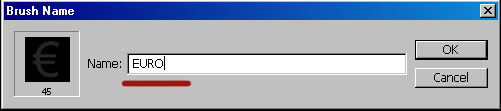
Step 2. Name your brush, so you'll easily find it later.
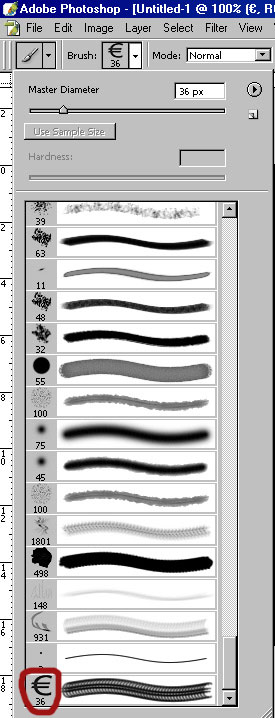
Step 3. Now make a new layer. As you can see, you will find your new brush at the bottom of all of your current brushes. Select it.
Now all we have to do is to put the settings of the brush correctly.
Step 4. The first part of the settings, shape dynamics will vary with the size of your brush.
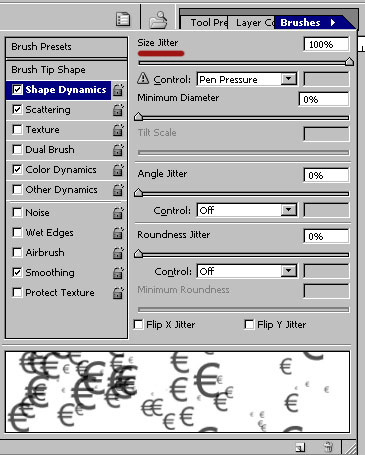
Step 5: Scattering will put the signs randomly over your layer. It disperses the signs when you brush.
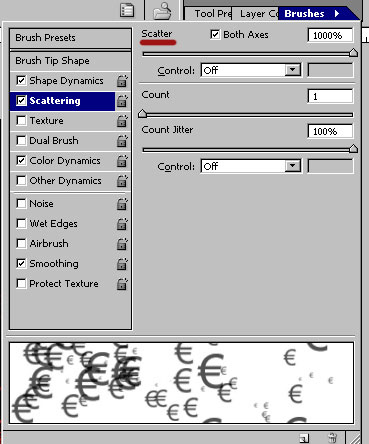
Step 6. Color dynamics will take care of the brightness part. It will vary the visibility of the signs.
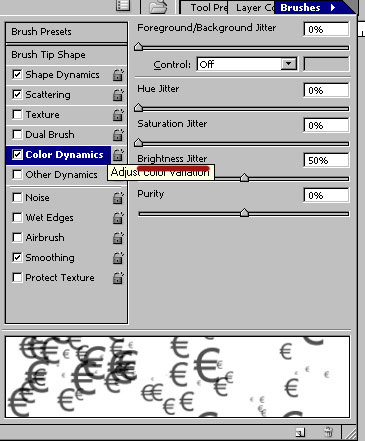
Step 7. Now just brush around on the new layer you created in step 3 and you'll get something similar to this:

Hope this helps you.
_________________
Witam
http://members.chello.be/wotsa
http://www.shadowness.com/witam |
|
|
|
|
 |
Jersey Hacker
Joined: 08 Jun 2005
Posts: 864
Location: Jersey, Channel Islands, UK
|
| Posted: Fri Jul 29, 2005 12:30 pm Post subject: |
|
|
Lol, its very nice actually, quite surprising how important money is these days! cool idea!
_________________
www.jerseyhacker.co.uk
Free File Uploader for Everyone to use |
|
|
|
|
|
<aazumak>

Joined: 22 Mar 2005
Posts: 384
Location: rhode island
|
| Posted: Wed Aug 10, 2005 7:32 pm Post subject: |
|
|
man, i ahve looked everywhere and have never been able to find brush dynamics... where are they, does ps 6 have them?> |
|
|
|
|
|
Jersey Hacker
Joined: 08 Jun 2005
Posts: 864
Location: Jersey, Channel Islands, UK
|
| Posted: Thu Aug 11, 2005 4:56 am Post subject: |
|
|
PS6 Doesnt have them i dont think, sorry, if it did have them, they would be in the top right hand corner, in a drop down tab
_________________
www.jerseyhacker.co.uk
Free File Uploader for Everyone to use |
|
|
|
|
|
|









