House M.D. fans unite at DrGregHouse.com
PhotoshopForums.com Home
Navigate Free Trade Publications Contact FAQ Search Members Profile Register Login
Add Us:   MySpace   Facebook   StumbleUpon
Username:    Password:
Remember Me?    
Recessed .PNG Effect.
BlinkList
del.icio.us
Furl
linkaGoGo
reddit
Simpy
Yahoo! My Web
 
Post new topic   Reply to topic    PhotoshopForums.com Forum Index -> General Photoshop Issues
 See a User Guidelines violation? Please contact us.
Author Message

mborner

Joined: 20 Oct 2007
Posts: 3


PostPosted: Fri Aug 01, 2008 10:50 am    Post subject: Recessed .PNG Effect. Reply with quote

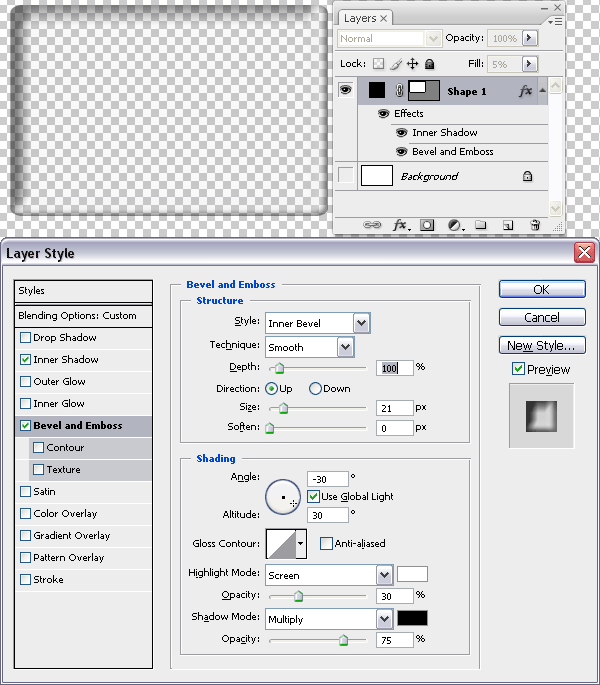
Does anyone know how to create this effect in CS2/CS3? The top picture is what I'm after. The bottom picture shows better with the white background. It's a transparent .png file.
Thanks.

View user's profile Send private message

doubrovski

Joined: 29 Sep 2007
Posts: 225


PostPosted: Sun Aug 03, 2008 1:46 am    Post subject: Reply with quote

Hi mborner,
- Reduce layer fill opacity
- Add "Bevel and Emboss" and "Inner Shadow" effects

Hope this helps.


shadow-emboss.gif
 Description:
 Filesize:  39.67 KB
 Viewed:  66 Time(s)

shadow-emboss.gif


_________________
Andrei Doubrovski
SimplePhotoshop.com
View user's profile Send private message

mborner

Joined: 20 Oct 2007
Posts: 3


PostPosted: Sun Aug 03, 2008 10:31 am    Post subject: Reply with quote

doubrovski, that helped immensely, thank you very much!
View user's profile Send private message
Display posts from previous:   
Post new topic   Reply to topic    PhotoshopForums.com Forum Index -> General Photoshop Issues All times are GMT - 6 Hours
Page 1 of 1
Jump to:  
You cannot post new topics in this forum
You cannot reply to topics in this forum
You cannot edit your posts in this forum
You cannot delete your posts in this forum
You cannot vote in polls in this forum
You cannot attach files in this forum
You can download files in this forum


Copyright © 2003-2008. PhotoshopForums.com, iFroggy Network. All Rights Reserved.
We Support phpBBHacks.com. Powered by phpBB © phpBB Group. phpBB SEO. Privacy Policy.
We are in no way affiliated with Adobe. Photoshop, Adobe and related marks are copyright to Adobe.
PhotoshopForums.com